

Criteria
Why did a message get that verdict? Here is LinkSentinel's decision logic, explained as concretely as we can.
The overall flow
A verdict is not based on a single factor; it is built up from several signals.
Note: This diagram shows the main steps. Results can differ depending on your settings and other analysis conditions. Please use it as a guide to the general approach.
Which list wins
Order of precedence
Verdicts are not based on the score alone; the type of list also determines what takes precedence.
- Blocked Senders (Blacklist) is checked first and results in "Blacklisted", ahead of every other setting.
- Watch Domains (Untrusted Domains, including the country and region settings), link text spoofing, spoofing of your own domain, and impersonation of a brand in Trusted Senders (Whitelist) that fails DMARC are fixed as "Dangerous". An exact match in Per-Sender Links (Per-Sender Whitelist) takes precedence over all of these except the blacklist.
- Brand impersonation (claiming a well-known brand without using its official domain) results in "Caution".
- Even without dangerous signs, a message with an explicit authentication failure outside forwarding and mailing lists, or whose Reply-To points to a different free-mail address, is not marked green but "Caution".
- Otherwise, the risk score decides. Even when the result would be safe, a first-time sender is marked "Needs Review".
See Editing the lists in Settings for how to register domains in each list.
Risk signals
Verdicts mainly combine the following clues.
- A URL written in the body whose domain differs from the real link destination (link text spoofing; redirects through legitimate delivery or tracking services or to the same company's domains are excluded)
- Link destinations unrelated to the part after @ in the sender's address (the sender domain; links to the same company's domains, social networks and delivery services are excluded)
- A sender whose display name claims a well-known brand but who is not on that brand's official domain (about 100 brands in Japan and abroad: postal services, tax authorities, banks, carriers, e-commerce, airlines and more; short abbreviations such as UPS or IRS are matched only when they appear as a whole word)
- A sender claiming the recipient's own domain that fails sender authentication and is backed by evidence such as suspicious links or an explicit authentication failure (including messages "from" yourself)
- A Reply-To that does not match the From (especially when only the reply address is a different free-mail address)
- Failed or unknown sender authentication aligned with the sender's domain
- A match with Watch Domains (Untrusted Domains), Blocked Senders (Blacklist) or the country and region settings
- Bitcoin addresses (extortion mail demanding payment)
- A sender you are hearing from for the first time (free-mail addresses are told apart address by address)
LinkSentinel compares the sender's address with a link destination to see whether they belong to the same organization. For example, mail.example.co.uk and www.example.co.uk belong to the same registered domain, example.co.uk. LinkSentinel identifies that boundary using the Public Suffix List. So even under country domains such as com.sa or co.th, two different companies are never treated as the same organization.
How authentication results are used
The following authentication results are used to judge whether a sender is being spoofed.
Only a pass that is aligned with the sender's domain counts as a pass (an SPF pass for an unrelated domain, for example, does not count). An explicit DMARC failure is a strong danger signal, but mailing lists and forwarding can break authentication even for legitimate mail, so in those cases it is given less weight. Forwarding is recognized from headers that indicate forwarding and from the subject prefixes added by mail clients around the world (Fwd: / FW: / WG: / TR: / RV: / I: / Enc: / VS: / Doorst: / 转发: and others).
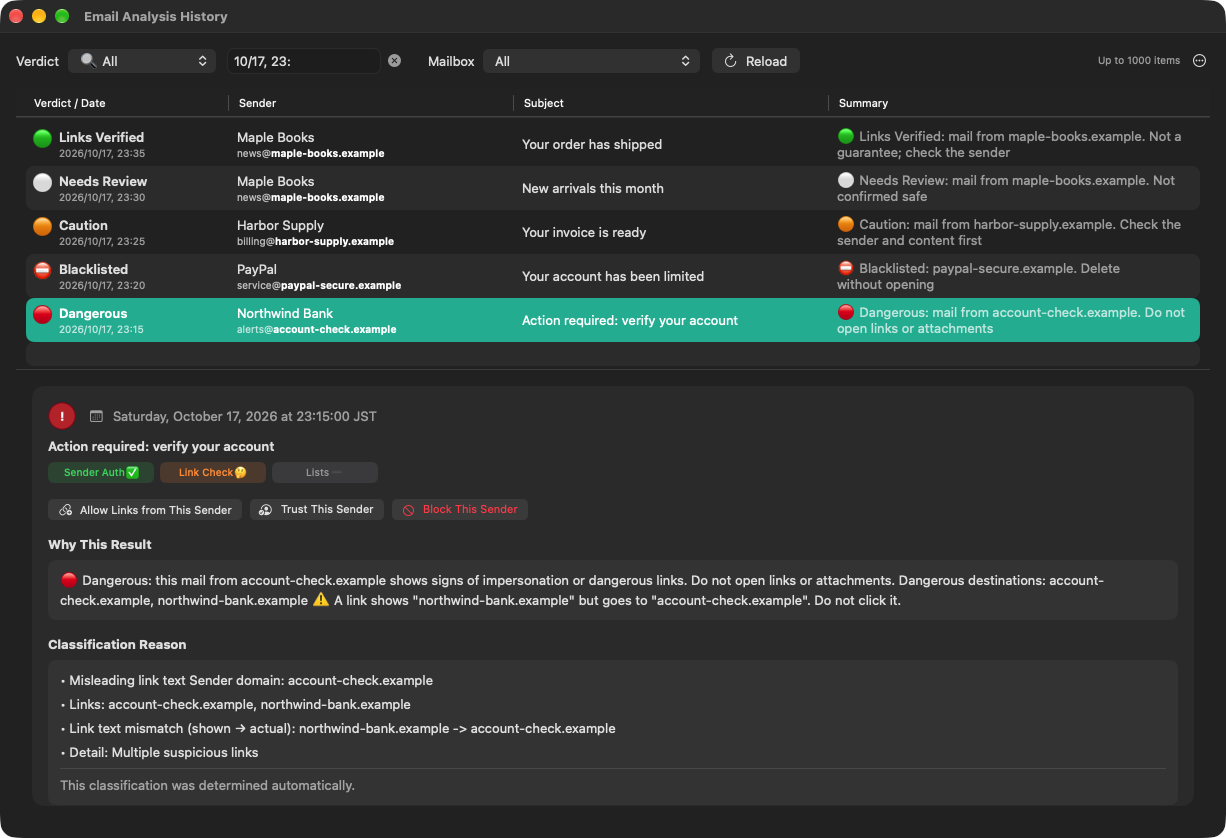
How clues are scored (risk scoring)
The exact weights used for scoring are not disclosed. Several risk signals are combined into a score, and the classification is decided by thresholds.
Classification categories
Results are shown as one of the following five levels.
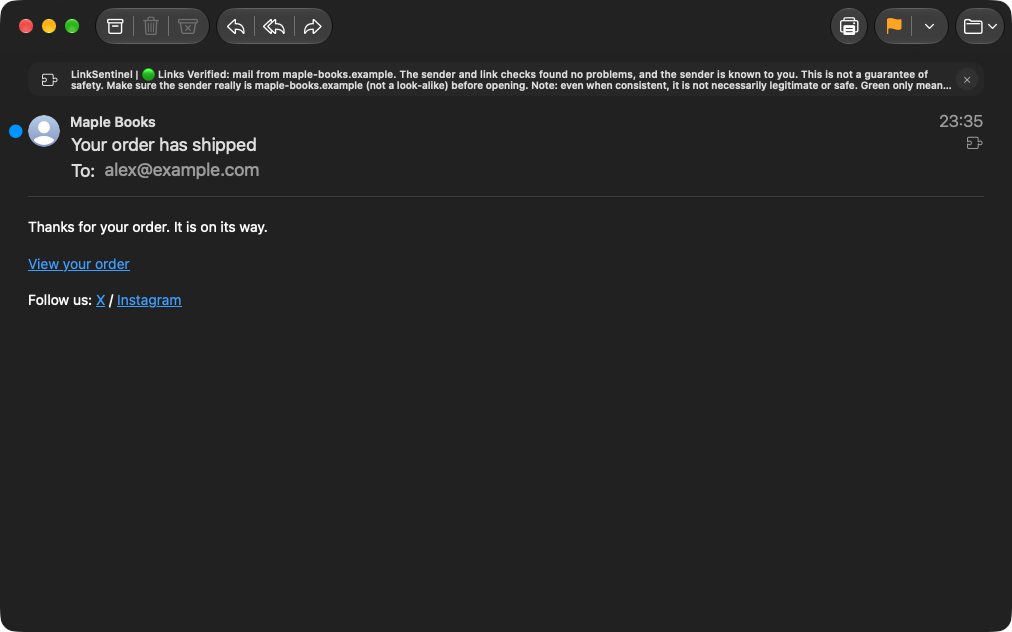
- A known sender (Trusted Senders, Contacts, Per-Sender Links, same-company domains, or mail received before)
- Sender authentication aligned with the sender's domain passes, or every link destination matches the sender
- No clues for Dangerous or Caution are found
- No clues for Dangerous or Caution are found
- But the sender is not in Trusted Senders, Contacts or Per-Sender Links, is not a same-company domain, and no mail has been received from it before
- Check that the sender's domain belongs to the company it claims to be
- Also covers messages whose body could not be analyzed and messages softened by Per-Sender Links
- The display name claims a well-known brand, but the domain is not official
- There are link destinations of unclear relevance to the sender
- An explicit authentication failure, or a Reply-To pointing to a different free-mail address
- A medium risk score
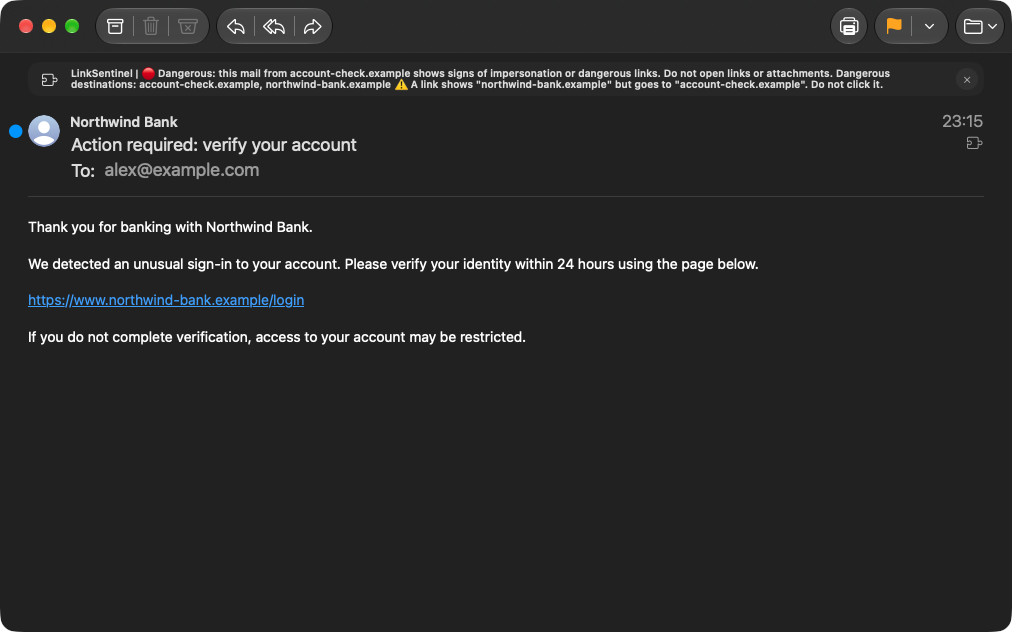
- A URL written in the body differs from the real link destination (link text spoofing; excluded when the real destination is in Trusted Senders, is a delivery service or belongs to the same company)
- The sender, a link destination or the Reply-To matches Watch Domains (including the country and region settings)
- Spoofing of your own domain (when authentication fails and there is evidence such as suspicious links or an explicit authentication failure), or impersonation of a brand in Trusted Senders that fails DMARC
- A Bitcoin address, or a risk score above the threshold
- The sender or a link destination matches Blocked Senders (Blacklist)
- Such as patterns of phishing domains made to look like real brands
- Takes precedence over every other setting
Settings that reduce false positives
To tune verdicts to the way you work, these settings help.
- Add trusted domains to Trusted Senders (Whitelist) (⌃⌥S, "Trust This Sender…", adds the sender's domain)
- For legitimate mail whose sender is genuine but whose links go to another domain, register it in Per-Sender Links (Per-Sender Whitelist) (⌃⌥A, "Allow Links from This Sender…")
- Register dangerous senders in Blocked Senders (Blacklist) (⌃⌥X, "Block This Sender…")
- Add domains you want treated as dangerous to Watch Domains (Untrusted Domains)
- For countries and regions you deal with, set "Country and Region Top-Level Domains" under Advanced Settings in the "General" tab to "Normal"
- Under "Recommended Settings" in "Verdicts & Actions", choose notifications, moving to Junk or colors (the default, "Watch only", does none of these)
See Settings for details.
Please note
LinkSentinel is a tool that gives you more information to decide with. It cannot stop 100% of threats. Whether to act on a suspicious link is ultimately your decision.
Know the criteria? Next, fine-tune in Settings
Adjust detection to the way you work and reduce false positives.